
If your Whirlpool washer displays the F0E1 (RL) error code (sometimes displayed as F0 E1), it means the washer has detected clothing, towels, or other items inside the drum while the Clean Washer cycle is running. The Clean Washer cycle is designed to clean the washer itself and must be operated with an empty drum.
The good news is that this is usually a simple issue that can be fixed without replacing any parts.
What This Guide Will Help You Fix
This guide explains what the Whirlpool washer F0E1 (RL) error code means, why it appears, and how to clear the error safely.
Common Symptoms of This Error Code
- Display shows F0E1 or F0E1 (RL)
- Clean Washer cycle stops unexpectedly
- Washer beeps and displays an error message
- Cleaning cycle will not start
- Washer refuses to continue the maintenance cycle
What Does Whirlpool Washer Error Code F0 E1 (RL) Mean?
Understanding the Error Code
The F0E1 (RL) error stands for Load Detected During Clean Washer Cycle.
Whirlpool washers use sensors to monitor drum movement and load conditions. During the Clean Washer cycle, the washer expects the drum to be completely empty. If the machine detects clothing, towels, blankets, or any other items inside, it stops the cycle and displays the F0E1 error.
How Serious Is This Error?
Minor Issue
In most cases, no parts are defective. The washer is simply preventing an improper cleaning cycle from running.
Common Causes of Whirlpool Washer Error Code F0E1 (RL)
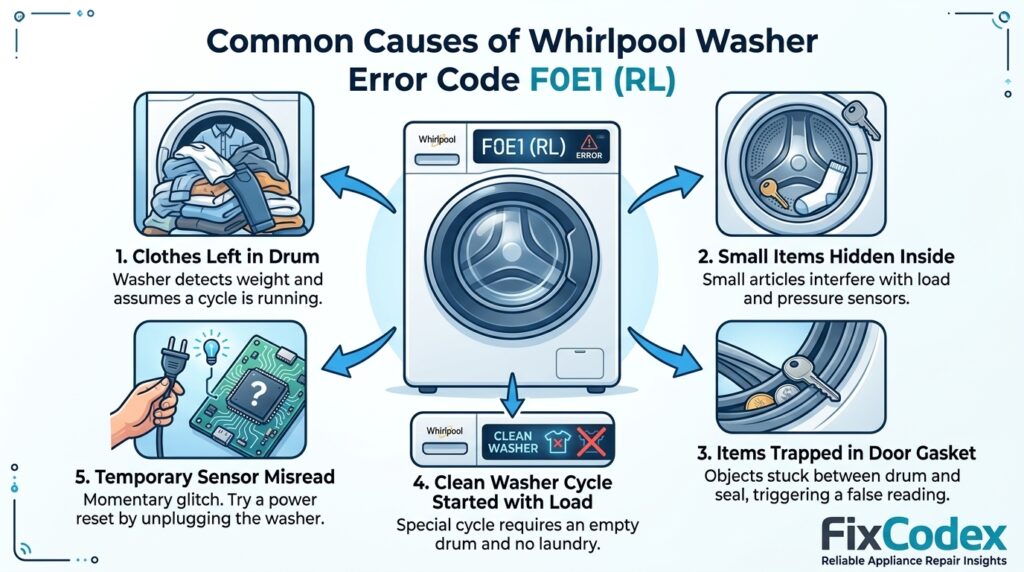
Main Reasons F0 E1 Error Appears
- Clothes left inside the drum
- Small items such as socks or towels remaining in the washer
- Objects trapped between the drum and door area
- Clean Washer cycle started accidentally with laundry inside
Environmental or User-Related Causes
- Overlooking items after a completed wash cycle
- Running maintenance cycles without emptying the washer
- Sensor confusion caused by bulky items left inside the drum
- Interrupted cleaning cycles that restart with laundry present
How to Identify the Problem Correctly
Check the F0E1 Error Code Display
Confirm the display shows:
- F0E1
- F0 E1 (RL)
- Load Detected During Clean Washer Cycle
Verify Your Washer Model
Locate the model number label:
- Inside the washer door
- Around the door frame
- Behind the control panel area
- On the rear cabinet panel
Always confirm the code interpretation using your specific Whirlpool model documentation.
Quick Fix F0E1 Error Code
Basic Reset Method
- Turn off the washer.
- Open the door completely.
- Remove all clothing and items from the drum.
- Unplug the washer for 5–10 minutes.
- Restore power.
- Restart the Clean Washer cycle.
Simple Checks Before Deep Repair
- Verify the drum is completely empty.
- Check for small items hidden inside the washer.
- Ensure nothing is trapped near the door seal.
- Confirm the Clean Washer cycle is selected correctly.
For most users, these steps immediately clear the F0E1 error.
Watch: Whirlpool Washer F0E1 Error Code Fix
F0E1 Error on Your Whirlpool Washer? Watch this quick video from Hameed Appliances Repair to learn the most common cause of the error and the simple steps to clear it.
Find out why the washer detects a load during the Clean Washer cycle and how to reset it without costly repairs.
Step-by-Step Fix Guide
Step 1: Empty the Washer Completely
Remove:
- Clothing
- Towels
- Bedding
- Socks
- Cleaning cloths
- Any loose objects
The drum must be completely empty before running the maintenance cycle.
Step 2: Inspect the Door Seal
Check the rubber gasket for:
- Socks
- Small garments
- Coins
- Foreign objects
Remove anything trapped inside the seal.
Step 3: Restart the Washer
- Turn the machine off.
- Wait one minute.
- Turn it back on.
- Select Clean Washer again.
Step 4: Check for Sensor Misreads
If the drum is empty but the error remains:
- Disconnect power for 10 minutes.
- Reconnect power.
- Run a short rinse cycle.
- Retry the Clean Washer cycle.
Step 5: Run the Clean Washer Cycle
Start the cycle with:
- No laundry inside
- Recommended washer cleaner or cleaning tablet (if applicable)
- Empty drum
Verify that the cycle completes without displaying F0E1.
Parts That May Be Faulty
Although uncommon, these components may occasionally contribute to repeated F0E1 errors:
Most Common Components
- Load sensing system
- Motor control system
- Main control board (PCB)
- Drum movement sensors
When Parts Are Likely Failing
- Error returns with an empty drum every time
- Multiple unrelated error codes appear
- Washer behaves erratically during normal cycles
- Control panel experiences communication issues
Most F0E1 cases do not require part replacement.
What Technicians Often Overlook
Hidden or Commonly Missed Issues
- A single sock hidden inside the drum
- Items trapped under the agitator (top-load models)
- Clothing caught in the door gasket (front-load models)
- Incomplete power reset
- Temporary sensor calibration issues
These small issues frequently trigger the error.
How to Prevent F0E1 Error in the Future
Regular Maintenance Tips
- Always empty the washer before running Clean Washer.
- Check the door seal after every wash.
- Remove small garments promptly.
- Perform monthly washer cleaning cycles.
Best Usage Practices
- Inspect the drum before starting maintenance cycles.
- Follow Whirlpool cleaning recommendations.
- Use washer cleaning tablets when recommended.
- Avoid interrupting cleaning cycles unnecessarily.
When to Call a Technician
Consider professional service if:
- F0E1 returns repeatedly with an empty drum.
- The washer displays multiple error codes.
- The control panel behaves unpredictably.
- The machine fails self-diagnostic tests.
- Sensor or control board issues are suspected.
Related Posts
- How to Fix Whirlpool Front Load Washer Error Code F5 E2
- How to Fix Whirlpool Front Load Washer Error Code F7 E1
- How to Fix dET Error Code – Whirlpool Front Load Washer
- Complete List of Whirlpool Washer Error Codes
Key Takeaway
The Whirlpool washer F0 E1 (RL) error code indicates that the machine detected laundry inside the drum during the Clean Washer cycle. Since the maintenance cycle must run with an empty washer, the machine stops the cycle and displays the error.
Most Likely Causes
- Clothing left in the washer
- Small items trapped inside the drum
- User accidentally starting Clean Washer with a load present
- Temporary sensor misread
Best Quick Fix Steps
- Remove all items from the drum.
- Inspect the door seal for hidden clothing.
- Reset the washer.
- Restart the Clean Washer cycle with an empty drum.
Next Step
Explore more Whirlpool washer error codes, troubleshooting guides, and maintenance tips on FixCodex to keep your appliance running efficiently. For official product information and support, visit Whirlpool Help.
Affiliate Disclosure: Some links on FixCodex may be affiliate links. If you purchase through these links, we may earn a small commission at no additional cost to you. This helps support our content and allows us to continue providing free repair and troubleshooting guides.