
Introduction
What this guide will help you fix
The dET error code on a Whirlpool front load washer indicates a problem related to the detergent system or dispenser detection. In most cases, it means the washer is having trouble detecting, dispensing, or properly using detergent.
This guide will help you understand the meaning of the error, identify the cause, and fix it step by step without unnecessary guesswork.
Common symptoms of dET error code
- Washer stops or pauses at the start of the cycle
- Display shows dET error code
- Detergent is not dispensing properly
- Laundry comes out not fully cleaned
- Soap remains in dispenser drawer
What Does dET Error Code Mean?
Understanding the error code
The dET error code typically appears when the washer detects an issue with the detergent system. In many Whirlpool front load models, this relates to the load & go detergent dispenser system or detergent level detection.
In simple terms, the machine is “confused” about detergent supply or cannot properly detect or dispense it.
This issue is commonly seen in Whirlpool front load washers that use automatic detergent dispensing systems.
How serious is this error?
- ⚠️ Usually minor to moderate issue
- Often fixable without replacing parts
- Rarely indicates major mechanical failure
Common Causes of dET Error Code
Main reasons this error appears
- Detergent cartridge not installed correctly
- Clogged or dirty dispenser system
- Low or empty detergent reservoir
- Sensor cannot detect detergent level
- Dispenser pump blockage
User or environmental causes
- Using incompatible detergent type
- Thick detergent causing clogging
- Not cleaning detergent drawer regularly
- Cartridge not seated properly after refill
How to Identify the Problem Correctly
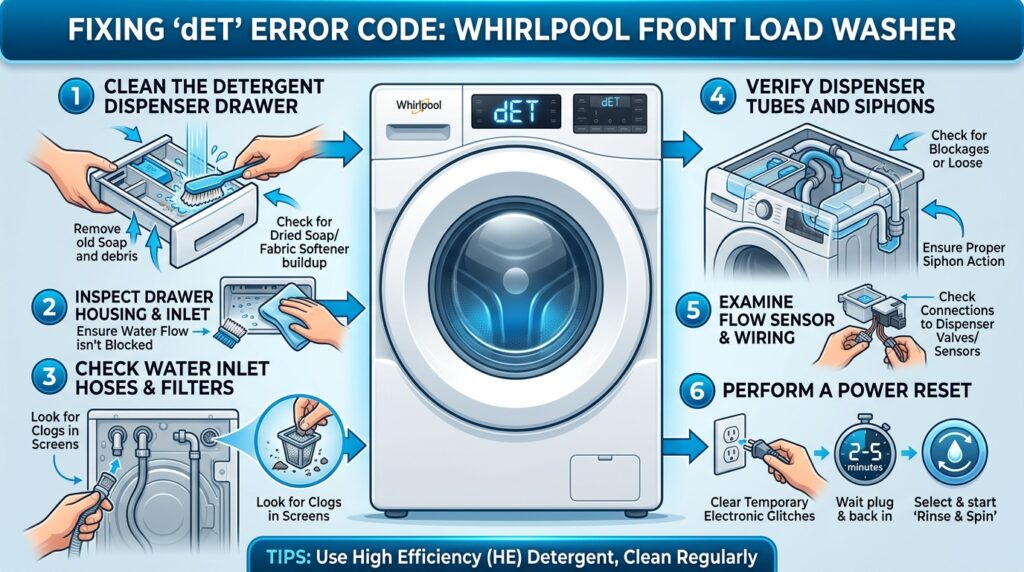
Check the detergent system
- Remove detergent cartridge
- Inspect for cracks or blockages
- Ensure correct installation position
Check washer model and system type
- Confirm if your model uses “Load & Go” system
- Some Whirlpool models use manual vs automatic dispensing
Quick Fix (Try This First)
Basic reset method
- Turn off the washer
- Unplug power for 5–10 minutes
- Restart and check if dET clears
Simple detergent system checks
- Remove and reinsert detergent cartridge
- Refill detergent to proper level
- Clean dispenser drawer thoroughly
- Make sure cartridge clicks into place
Step-by-Step Fix Guide
Step 1: Inspect detergent cartridge
- Remove cartridge from dispenser
- Check for cracks or clogging
- Clean with warm water if needed
Step 2: Clean dispenser system
- Remove detergent drawer
- Wash all compartments thoroughly
- Remove soap buildup or residue
Step 3: Check detergent type
- Use recommended HE (High Efficiency) detergent
- Avoid overly thick or concentrated soap
Step 4: Reset washer system
- Power cycle the machine
- Run a short wash cycle test
Step 5: Test dispensing function
- Run normal cycle with small load
- Check if detergent is properly released
Parts That May Be Faulty
Most common components involved
- Detergent cartridge / Load & Go system
- Dispenser pump
- Detergent level sensor
- Control board (PCB)
- Dispenser valve assembly
When parts may be failing
- Error returns after cleaning and reset
- Detergent never dispenses at all
- Cartridge appears full but not detected
You can find replacement parts and compare prices on eBay for the most common components that may cause this issue: detergent cartridge (Load & Go system), dispenser pump, detergent level sensor, control board (PCB), and dispenser valve assembly.
What Technicians Often Overlook
Hidden issues that cause dET error
- Hardened detergent blocking internal tube
- Slight misalignment of cartridge seating
- Moisture interfering with sensor reading
- Using non-compatible detergent brands
How to Prevent This Error in the Future
Regular maintenance tips
- Clean detergent drawer monthly
- Flush dispenser system with warm water
- Use only HE-compatible detergent
- Avoid overfilling detergent reservoir
Best usage practices
- Insert cartridge firmly every time
- Do not mix detergent types
- Keep dispenser area dry and clean
When to Call a Technician
Professional help is needed if:
- dET error persists after cleaning and reset
- Detergent system does not respond at all
- Sensor or pump appears defective
- Washer stops dispensing completely
Related Error Codes
Similar detergent or dispenser issues
- Sud / SUD error (excess foam)
- F8 E1 (water supply issue affecting dispensing)
- Dispenser system communication errors (model dependent)
Conclusion
Key takeaway
The dET error code is usually caused by detergent cartridge, dispenser clogging, or detection issues—not a major failure. Most users can fix it by cleaning, reseating the cartridge, or resetting the machine.
Next step
If the error continues, it may indicate a faulty dispenser sensor or pump that requires professional repair. For more guides, explore other Whirlpool washer error codes in the FixCodex library.
If the error continues, it may indicate a faulty dispenser sensor or pump that requires professional repair. For more guides, explore other Whirlpool washer error codes in the FixCodex library.
You can also check official Whirlpool troubleshooting resources here: Whirlpool Product Help
Related Posts:
- How to Fix Whirlpool Front Load Washer Error Code F5 E2
- How to Fix Whirlpool Front Load Washer Error Code F7 E1
- Washer Error Codes by Brands
Affiliate disclosure: Some links may be affiliate links, meaning we may earn a small commission at no extra cost to you.