
A Whirlpool washer not filling with water is a common problem that prevents the wash cycle from starting. Depending on the issue, the washer may not fill at all, fill very slowly, or only fill with either hot or cold water.
The problem can be caused by something simple, such as a closed water supply valve or clogged inlet screen, or by a failed component like the water inlet valve, pressure sensor, or main control board.
“No water? The inlet valve may be the problem.”
This troubleshooting guide explains the most common causes and the Whirlpool washer parts you should inspect before replacing any components.
Symptoms of a Whirlpool Washer Not Filling With Water
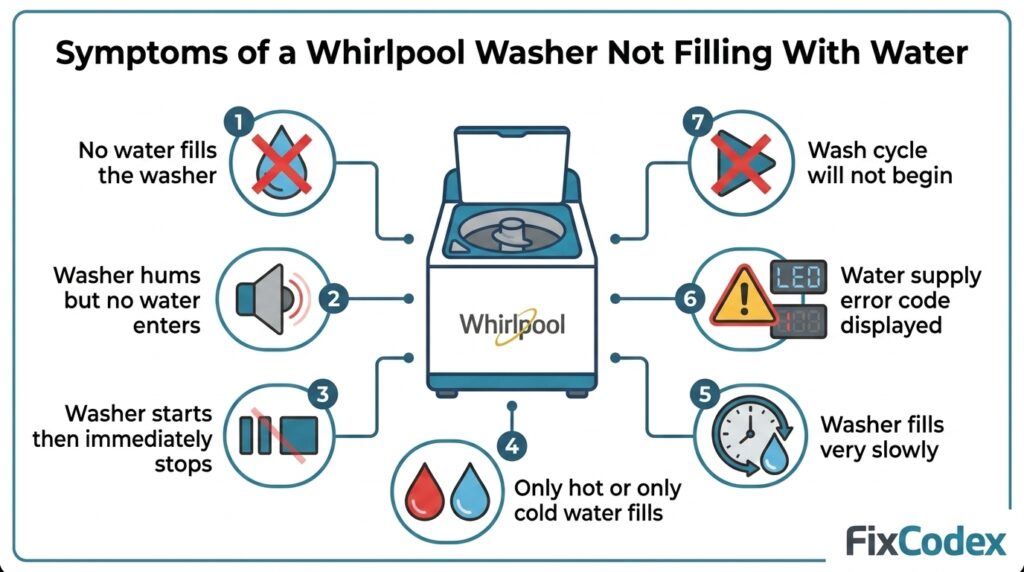
You may notice one or more of these symptoms:
- Washer does not fill with water.
- Washer hums but no water enters.
- Washer starts but immediately stops.
- Only hot water or only cold water fills.
- Washer fills very slowly.
- Error code related to water supply appears.
- Wash cycle will not begin.
Common Causes of Whirlpool Washer Not Filling With Water
1. Faulty Water Inlet Valve
The water inlet valve is the most common reason a Whirlpool washer won’t fill with water.
This electrically controlled valve opens when the washer begins the fill cycle. If it becomes clogged with mineral deposits or the internal solenoid fails, water cannot enter the machine.
Signs of a Bad Water Inlet Valve
- No water enters the washer.
- Water enters only on one temperature setting.
- Valve receives power but does not open.
- Valve leaks or sticks open.
Inspect for:
- Burned electrical terminals
- Cracked valve body
- Mineral buildup
- Failed solenoid
2. Kinked or Damaged Water Supply Hoses
The hot and cold water supply hoses deliver water from your home’s plumbing to the washer.
A hose that is bent, kinked, frozen, or damaged can severely reduce water flow.
Check for:
- Sharp bends
- Crushed hoses
- Leaks
- Loose connections
Straighten or replace damaged hoses if necessary.
3. Clogged Water Inlet Screens (Filters)
Most Whirlpool washers have small mesh screens inside the inlet valve.
These screens trap sand, rust, and sediment before they enter the washer.
Over time, the screens can become clogged and reduce water flow.
Cleaning the Inlet Screens
- Turn off the water supply.
- Disconnect both hoses.
- Carefully remove debris from the screens.
- Reconnect the hoses.
- Test the washer.
Avoid removing the screens completely since they protect the inlet valve.
4. Low Water Pressure
Whirlpool washers require adequate household water pressure to fill properly.
Low water pressure may be caused by:
- Partially closed shutoff valves
- Plumbing problems
- Municipal water supply issues
- Frozen pipes
Both the hot and cold water valves should be fully open.
5. Defective Pressure Sensor
Many newer Whirlpool washers use a pressure sensor to detect the water level inside the tub.
If the sensor sends incorrect readings, the control board may believe the washer is already full and stop the fill cycle.
Symptoms include:
- Washer fills briefly then stops.
- No filling at all.
- Incorrect water level.
- Random water level errors.
6. Failed Main Control Board
The main control board manages every stage of the wash cycle, including opening the water inlet valve.
If the board fails, it may never send power to the inlet valve even though every other component is functioning correctly.
Control board failures are less common but should be considered after all other causes have been eliminated.
Whirlpool Washer Error Codes Related to Water Filling Problems
Many modern Whirlpool washers display an error code when they detect a problem with the water supply or water level. These codes can help narrow down the cause before replacing any parts.
LF or F8 E1 – Long Fill Error
The LF (Long Fill) or F8 E1 error indicates that the washer is taking too long to fill with water.
Possible causes include:
- Closed hot or cold water supply valve
- Low household water pressure
- Kinked or pinched water supply hoses
- Clogged water inlet screens (filters)
- Faulty water inlet valve
- Defective pressure sensor
Recommended checks:
- Verify both water supply valves are fully open.
- Inspect the hoses for kinks or damage.
- Clean the inlet screens.
- Test the water inlet valve for proper operation.
F3 E1 – Pressure Sensor Error
The F3 E1 error usually points to a problem with the pressure sensor or the pressure sensing system.
When the pressure sensor sends incorrect water level readings, the washer may stop filling or refuse to start a wash cycle.
Possible causes include:
- Failed pressure sensor
- Damaged pressure hose
- Blocked pressure hose
- Loose electrical connection
- Faulty control board
F8 E3 – Overflow Condition
The F8 E3 error indicates that the washer detects too much water in the tub.
Although this code is related to overfilling, it may also be caused by components that control water filling.
Possible causes include:
- Water inlet valve stuck open
- Defective pressure sensor
- Failed control board
- Pinched or blocked pressure hose
F0 E4 – Water Temperature Problem
Some Whirlpool models display F0 E4 when the incoming water temperature is outside the expected range.
This may occur if:
- Hot and cold supply hoses are reversed.
- One water supply is turned off.
- The hot or cold inlet valve is malfunctioning.
No Error Code Displayed
A Whirlpool washer may fail to fill with water without showing any error code.
In these cases, inspect the following components:
- Water inlet valve
- Water supply hoses
- Water inlet screens (filters)
- Household water pressure
- Pressure sensor
- Main control board
Error Code Quick Reference
| Error Code | Description | Most Common Causes |
|---|---|---|
| LF | Long Fill | Low water pressure, clogged filters, faulty inlet valve |
| F8 E1 | Long Fill | Closed water valve, kinked hose, inlet valve failure |
| F3 E1 | Pressure System Error | Pressure sensor, pressure hose, control board |
| F8 E3 | Overflow Detected | Stuck inlet valve, pressure sensor, control board |
| F0 E4 | Water Temperature Error | Incorrect hose connections, water supply issue |
Related Error Code Guides
If your washer displays one of these codes, you may also find these troubleshooting articles helpful:
- Whirlpool Washer LF Error Code
- Whirlpool Washer F8 E1 Error Code
- Whirlpool Washer F3 E1 Error Code
- Whirlpool Washer F8 E3 Error Code
- Whirlpool Washer F0 E4 Error Code
- Whirlpool Washer Error Codes Explained
These dedicated guides provide model-specific troubleshooting steps, possible causes, and repair recommendations for each Whirlpool washer error code.
Whirlpool Washer Not Filling With Hot or Cold Water
Sometimes the washer fills with only one water temperature.
Possible causes include:
- Failed hot water inlet valve solenoid
- Failed cold water inlet valve solenoid
- Closed household water valve
- Clogged inlet screen
- Kinked hose
Testing both temperature settings can help identify which side has the problem.
How to Troubleshoot a Whirlpool Washer Not Filling With Water
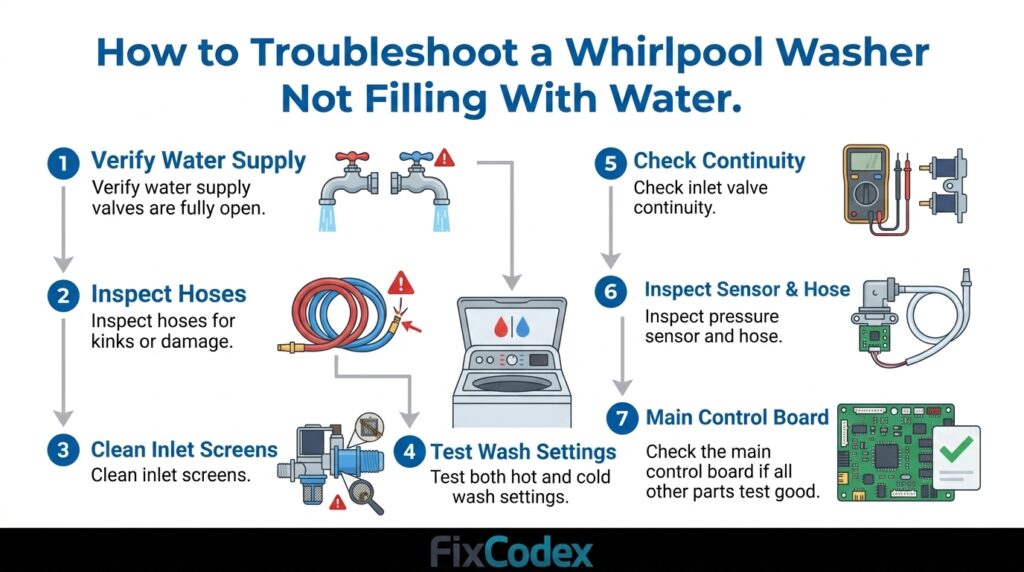
Follow these steps in order:
Step 1
Verify both household water supply valves are fully open.
Step 2
Inspect the hot and cold water supply hoses for kinks or damage.
Step 3
Clean the inlet screens on the water inlet valve.
Step 4
Test the washer using both hot and cold wash settings.
Step 5
Test the water inlet valve for electrical continuity using a multimeter.
Step 6
Inspect the pressure sensor and pressure hose.
Step 7
Check the main control board if all other components test good.
Common Parts to Check
If your Whirlpool washer is not filling with water, inspect these parts first:
- Water Inlet Valve
- Water Supply Hoses
- Water Inlet Screens (Filters)
- Pressure Sensor
- Pressure Hose
- Main Control Board
F8E1 & LoFL Error Code? Your Washer Isn’t Filling—Here’s Why
If your washer is showing the F8E1 or LoFL (Low Fill) error code, it means water isn’t entering the machine properly.
This quick guide, by W Service, shows how to check the water valves, hoses, and inlet screens on Whirlpool, Maytag, and Amana washers so you can fix the issue and get your laundry cycle running again.
Frequently Asked Questions
Why is my Whirlpool washer not filling with water but has power?
The washer may have power, but a failed water inlet valve, clogged inlet screens, low water pressure, or defective pressure sensor can prevent water from entering the tub.
Can a clogged filter stop a Whirlpool washer from filling?
Yes. Dirty inlet screens can significantly reduce or completely block water flow into the washer.
How do I know if my Whirlpool water inlet valve is bad?
If the valve receives electrical power but does not allow water to enter, or only fills on one temperature setting, the inlet valve is likely defective.
Can low water pressure prevent the washer from filling?
Yes. Whirlpool washers require sufficient water pressure for proper operation. Low household water pressure can cause slow filling or prevent filling entirely.
Is the control board responsible for water filling?
Yes. The main control board sends power to the water inlet valve. If the board fails, the valve may never open.
Other Whirlpool Washer Problems
A Whirlpool washer not filling with water is most commonly caused by a faulty water inlet valve, clogged inlet screens, kinked supply hoses, or low household water pressure. On newer models, a defective pressure sensor or main control board can also interrupt the filling process.
Begin troubleshooting with the simple checks—verify the water supply, inspect the hoses, and clean the inlet filters. If those steps do not resolve the issue, test the inlet valve and pressure sensor before considering replacement of the control board.
Related Articles
Affiliate Disclosure: Some links on this site are affiliate links. We may earn a small commission if you purchase through them, at no extra cost to you. This helps support our content and guides.
2 thoughts on “Whirlpool Washer Not Filling With Water”