
If your Whirlpool WTW5000DW washer won’t start, the problem may be caused by a power issue, control panel problem, lid switch, water supply, control board, or another component that prevents the washer from beginning the cycle.
The good news is that many WTW5000DW starting problems can be diagnosed without immediately replacing a part.
“Diagnose the problem first—your WTW5000DW may not need a replacement part.”
This guide explains the most common reasons a Whirlpool WTW5000DW won’t start, what to check first, and which parts may need to be replaced.
Whirlpool WTW5000DW Won’t Start: Quick Troubleshooting
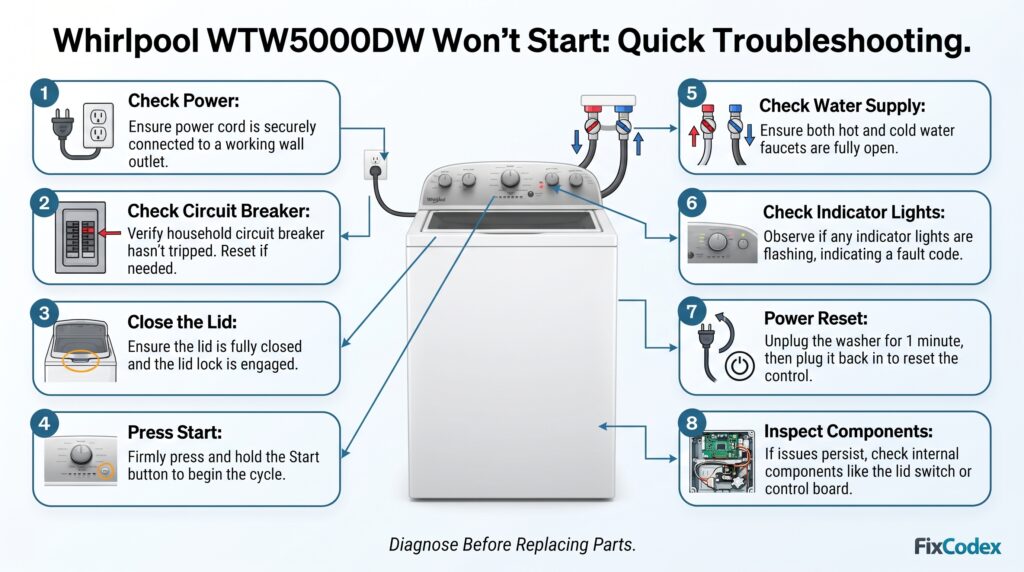
Before replacing any parts, try these basic checks:
- Make sure the washer is plugged directly into a working wall outlet.
- Check the household circuit breaker.
- Make sure the washer lid is completely closed.
- Select a wash cycle and press Start firmly.
- Make sure the water supply valves are turned on.
- Check whether any indicator lights are flashing.
- Unplug the washer for several minutes and reconnect it.
- If the washer still won’t start, check the lid lock/switch, control system, wiring, and other components.
If the washer has power but does not begin the cycle, continue with the troubleshooting steps below.
1. Check the Power Supply
The first thing to check when your WTW5000DW won’t start is whether the washer is receiving electrical power.
Make sure the power cord is securely connected to the outlet.
Try plugging another appliance into the same outlet to verify that the outlet works.
Also check your home’s circuit breaker. A tripped breaker can prevent the washer from operating.
What to check
- Power cord
- Wall outlet
- Circuit breaker
- Electrical connections
If the washer has no lights or response at all, a power-supply problem should be investigated before replacing washer components.
2. Make Sure the Washer Lid Is Closed
A Whirlpool top-load washer may not begin a wash cycle if the lid is not properly closed or if the washer cannot detect that the lid is closed.
Close the lid firmly and try starting the cycle again.
Check for:
- A lid that does not close completely
- A damaged lid strike
- A defective lid switch or lid-lock mechanism
- Objects preventing the lid from closing
If the washer works when the lid is manipulated or pressed down, the lid-sensing mechanism may need further inspection.
3. Check the Start Button and Control Panel
If the washer has power but pressing Start does nothing, the control interface may be part of the problem.
Try selecting another cycle and then pressing Start.
Look for:
- Unresponsive buttons
- Missing indicator lights
- Flashing lights
- Random button behavior
- Controls that stop responding
If several controls are unresponsive, the problem may involve the user interface, wiring, or main electronic control.
4. Check the Water Supply
A washer needs an adequate water supply to begin and complete its operating sequence.
Make sure both water supply valves are fully open.
Inspect the inlet hoses for:
- Kinks
- Blockages
- Leaks
- Damaged hoses
Also check the water inlet screens if appropriate.
A restricted water supply can cause the washer to remain in a sensing or filling stage instead of proceeding normally.
5. Look for Flashing Lights or Error Codes
Pay attention to the control panel when you try to start the washer.
Flashing indicators can provide important clues about the problem.
Record exactly which lights are flashing and how they behave.
For example, note whether:
- One light flashes repeatedly
- Several lights flash together
- The washer beeps
- The washer starts sensing and then stops
- The washer remains completely unresponsive
The exact diagnostic procedure and fault codes can vary by washer configuration, so use the technical documentation for the specific model and revision when performing advanced diagnostics.
6. Try a Power Reset
A temporary electronic problem can sometimes prevent the washer from responding normally.
You can try disconnecting the washer from power and then reconnecting it.
Basic reset procedure
- Turn the washer off.
- Disconnect it from the electrical outlet.
- Wait several minutes.
- Reconnect the washer.
- Select a wash cycle.
- Close the lid.
- Press Start.
If the washer starts working normally after the reset but the problem returns later, there may be an underlying electrical or control-system issue.
7. Inspect the Lid Switch or Lid-Locking System
One of the important components to investigate when a WTW5000DW won’t start or won’t begin the cycle is the lid-sensing system.
The washer needs to know that the lid is in the correct position before certain operations can begin.
A faulty lid switch, lock mechanism, actuator, strike, or related wiring can prevent normal operation.
Possible symptoms
- Washer has power but won’t start
- Washer won’t enter the wash cycle
- Washer stops unexpectedly
- Washer does not spin
- Washer does not respond normally when the lid is closed
Inspect the lid components for visible damage and verify the correct part for your specific washer revision before ordering a replacement.
8. Check the Wiring and Connections
Loose, damaged, or corroded electrical connections can cause intermittent washer problems.
If you are comfortable performing appliance diagnostics, inspect accessible wiring connections according to the manufacturer’s service information.
Look for:
- Loose connectors
- Damaged wires
- Burn marks
- Corrosion
- Broken terminals
Do not work on electrical components while the washer is connected to power.
9. The Main Control Board May Be the Problem
If the washer has proper power, the controls are not responding correctly, and other components have been ruled out, the main control board may need to be investigated.
The control board manages many washer functions, including the sequence required to start and operate a wash cycle.
A failing control board can produce symptoms such as:
- Washer won’t start
- Washer starts intermittently
- Buttons do not respond
- Cycle stops unexpectedly
- Unusual flashing lights
- Washer behaves unpredictably
However, do not replace the control board based only on the symptom “won’t start.”
Test the appropriate components and wiring first. A different component can create similar symptoms.
Whirlpool WTW5000DW Error Codes
If your Whirlpool WTW5000DW won’t start, check the washer’s display or indicator lights for an error code or flashing sequence. An error code can help identify the area that needs troubleshooting.
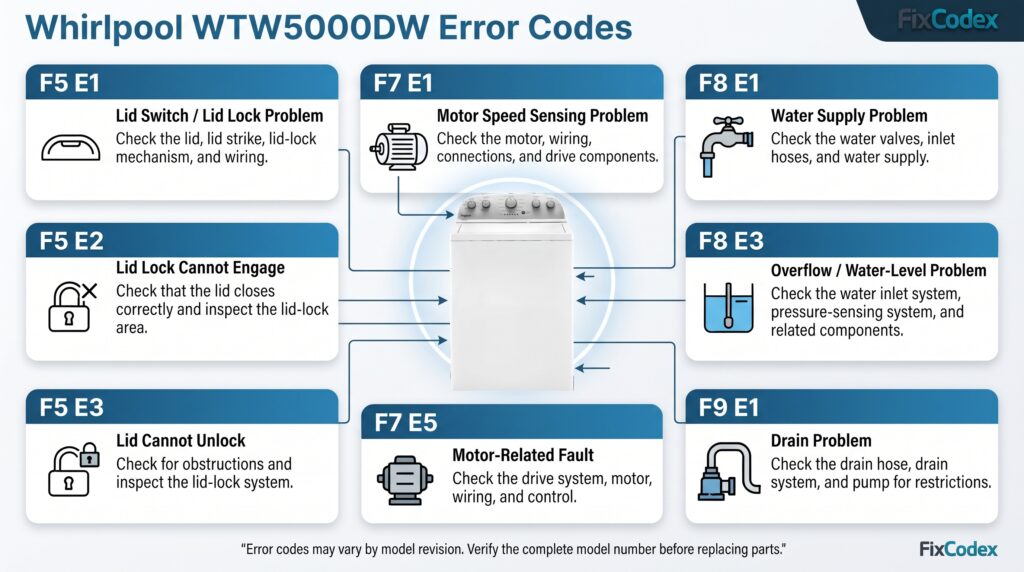
The exact codes and diagnostic procedures can vary by model revision, so always verify the complete model number and use the appropriate technical documentation before replacing a part.
Common WTW5000DW Error Codes and Possible Causes
| Error Code | Possible Problem | What to Check |
|---|---|---|
| F5 E1 | Lid switch/lid lock problem | Check the lid, lid strike, lid-lock mechanism, and wiring |
| F5 E2 | Lid lock cannot engage | Make sure the lid closes correctly and inspect the lid-lock area |
| F5 E3 | Lid cannot unlock | Check for an obstruction around the lid and inspect the lid-lock system |
| F7 E1 | Motor speed sensing problem | Check the motor, wiring, connections, and related drive components |
| F7 E2 | Motor/control problem | Inspect the motor circuit, wiring, and electronic control |
| F7 E5 | Motor-related fault | Check the drive system, motor, wiring, and control |
| F8 E1 | Water supply problem | Make sure both water valves are open and check the inlet hoses |
| F8 E3 | Overflow or water-level problem | Check the water inlet system, pressure-sensing system, and related components |
| F9 E1 | Drain problem | Check the drain hose, drain system, and pump for restrictions |
F5 E1 — Lid Switch or Lid Lock Problem
The F5 E1 code can indicate a problem related to the washer’s lid-sensing system.
If your WTW5000DW displays F5 E1:
- Make sure the lid is completely closed.
- Check for objects preventing the lid from closing.
- Inspect the lid strike.
- Inspect the lid-lock or lid-switch mechanism.
- Check the associated wiring and connectors.
A problem in this area can prevent the washer from starting.
F5 E2 — Lid Lock Cannot Engage
The F5 E2 code can indicate that the washer cannot properly engage the lid-lock system.
Check that the lid closes correctly and that nothing is blocking the locking mechanism.
If the lid appears normal but the code returns, the lid-lock system, wiring, or control system may require further diagnosis.
F5 E3 — Lid Cannot Unlock
The F5 E3 code can indicate that the washer is unable to unlock the lid.
Check for anything physically obstructing the lid or locking mechanism. If the lid remains locked after the cycle, further inspection of the lid-lock system may be necessary.
F7 E1 — Motor Speed Sensing Problem
The F7 E1 code can indicate that the washer is having difficulty detecting the expected motor speed.
Possible areas to investigate include:
- Motor
- Motor wiring
- Electrical connectors
- Drive components
- Main electronic control
A motor-related error does not automatically mean the motor needs to be replaced.
F8 E1 — Water Supply Problem
The F8 E1 code can indicate that the washer is not receiving the expected amount of water.
Check:
- Both water supply valves are fully open.
- The inlet hoses are not kinked.
- The water inlet screens are not restricted.
- The household water supply is working properly.
- The water inlet system and related components are functioning correctly.
A water-supply problem may prevent the washer from progressing through the cycle.
F9 E1 — Drain Problem
The F9 E1 code can indicate a drain-system problem.
Check the drain hose for:
- Kinks
- Blockages
- Incorrect installation
- Restrictions
Also investigate the washer’s drain system and pump if the washer is unable to remove water properly.
Error Codes vs. Flashing Lights
Some Whirlpool top-load washers may communicate diagnostic information through flashing indicator lights rather than displaying a conventional alphanumeric code on a screen.
If your WTW5000DW has flashing lights instead of a displayed error code, record:
- Which lights are flashing
- How many times they flash
- Whether the pattern repeats
- Whether the washer beeps
- What the washer was doing immediately before the problem occurred
This information can help identify the appropriate diagnostic procedure.
Important: Don’t Replace Parts Based Only on an Error Code
An error code identifies a problem area, but it does not always identify the exact failed part.
For example, a motor-related code could be caused by the motor, wiring, connections, drive components, or electronic control.
Before purchasing a replacement part:
Read the code → Identify the affected system → Inspect the components → Test the suspected part → Confirm the failure → Replace the part
Using the complete Whirlpool model number, including the model suffix when applicable, is also important when checking replacement-part compatibility.
WTW5000DW Won’t Start but Has Power
If your Whirlpool WTW5000DW has power but will not start, focus on these areas:
| Symptom | Possible cause |
|---|---|
| No lights or response | Power supply, control, wiring |
| Lights work but Start does nothing | Control interface, lid system, control |
| Washer senses but doesn’t continue | Water supply, sensing/control issue |
| Washer won’t start with lid closed | Lid switch/lock or wiring |
| Washer starts intermittently | Electrical connection or control problem |
| Washer starts then stops | Lid system, control, water supply, or another component |
These are possible causes, not a definitive diagnosis. Proper testing is recommended before purchasing replacement parts.
WTW5000DW Won’t Start After a Power Outage
If the washer stopped working after a power interruption, first check the home’s circuit breaker and the washer’s electrical supply.
Then try disconnecting the washer from power for several minutes before reconnecting it.
If other appliances work normally but the washer remains unresponsive, further diagnosis of the washer’s electrical and control system may be necessary.
WTW5000DW Won’t Start After Moving the Washer
If the washer recently moved, check the basics first.
Make sure:
- The power cord is connected correctly.
- The washer is receiving power.
- Water supply hoses are connected correctly.
- Water valves are open.
- The lid closes properly.
- No wiring or connector was disturbed.
A loose connection can sometimes appear after an appliance has been moved.
When Should You Replace a Part?
Don’t replace a component simply because the washer won’t start.
A better approach is:
Symptom → Diagnosis → Test → Confirm defective part → Replace part
For example:
WTW5000DW won’t start
↓
Check power
↓
Check lid system
↓
Check controls and indicators
↓
Check wiring/connections
↓
Check relevant components
↓
Confirm defective part
↓
Install the correct replacement part
This approach can help prevent unnecessary parts purchases.
Top-Load Washer Won’t Start? Watch This Troubleshooting Video
Is your top-load washer not starting or completely unresponsive? This helpful video from RepairClinic.com walks through common causes and troubleshooting steps to help you identify the problem before replacing any parts.
Watch the video to learn what to check first and how to troubleshoot a top-load washer that won’t start.
Find Whirlpool WTW5000DW Parts on eBay
Looking for replacement parts for your Whirlpool WTW5000DW washer? You can check available WTW5000DW parts on eBay, including control boards, lid switches, pumps, valves, and other replacement components.
Before ordering, verify your complete washer model number and part number to make sure the replacement part is compatible.
Check current WTW5000DW parts on eBay for available listings, shipping options, and return policies.
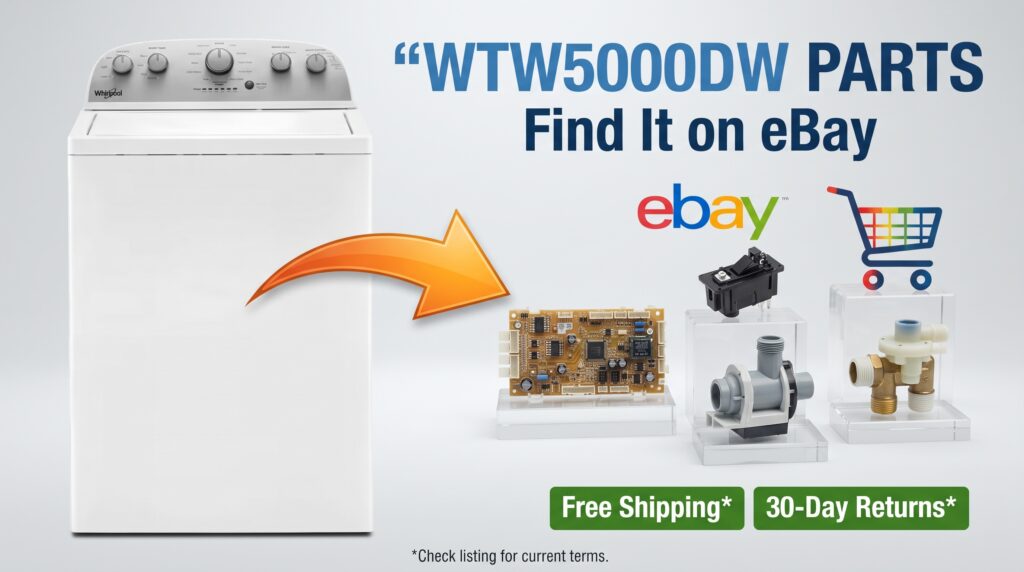
Shipping availability and return terms vary by individual seller and listing. Check the eBay listing for the current details, including whether free shipping and 30-day returns are offered.
Frequently Asked Questions
Why won’t my Whirlpool WTW5000DW start?
A WTW5000DW that won’t start may have a power-supply problem, lid-sensing problem, control-panel issue, water-supply problem, wiring issue, or defective electronic control. Start with the simplest checks before replacing parts.
Why does my WTW5000DW have power but won’t start?
If the washer has power but doesn’t begin the cycle, check whether the lid is closing correctly, whether the controls respond, and whether any lights are flashing. Further diagnosis may be required if these checks don’t identify the problem.
Why won’t my Whirlpool washer start when I press Start?
Possible causes include an unrecognized lid condition, unresponsive controls, an electrical problem, or a control-system fault. Check the lid and control panel first.
Can a bad control board cause a WTW5000DW not to start?
Yes. A defective electronic control can cause a washer to become unresponsive or fail to begin a cycle. However, other components can cause similar symptoms, so the control board should be properly diagnosed before replacement.
How do I reset my Whirlpool WTW5000DW?
Disconnecting the washer from power for several minutes and reconnecting it can sometimes clear a temporary electronic issue. If the problem returns, additional troubleshooting is needed rather than repeatedly resetting the washer.
Where can I find the WTW5000DW model number?
The model and serial number label is typically located on the washer cabinet or under/around the lid area. Always use the complete model number when looking for replacement parts because different revisions may use different components.
If your Whirlpool WTW5000DW won’t start, begin with the simple checks: power, circuit breaker, lid position, controls, water supply, and indicator lights.
If these checks don’t solve the problem, inspect the relevant components and wiring using the correct service information for your specific washer.
Most importantly, identify the failed component before ordering a replacement part. The correct part can vary depending on the complete model number and washer revision.
If you need replacement parts for your Whirlpool washer, search using the complete model number to improve the chance of finding the correct compatible part.
Related Whirlpool Washer Troubleshooting
- Whirlpool WTW5000DW Won’t Spin
- Whirlpool WTW5000DW Won’t Drain
- Whirlpool WTW5000DW Not Agitating
- Whirlpool WTW5000DW Not Filling With Water
- Whirlpool WTW5000DW Sensing Light Flashing
- Whirlpool Washer Won’t Start
- Whirlpool Washer Error Codes
Other Washer Troubleshooting Guides:
- Whirlpool Washer Making Loud Noise: Causes, Symptoms, and How to Fix It
- Whirlpool Washer Not Completing the Cycle: Causes, Troubleshooting, and Fixes
- Whirlpool Washer Stuck on Sensing
Affiliate Disclosure: This page may contain affiliate links. If you purchase a product through one of these links, we may earn a small commission at no extra cost to you.