

Is your Whirlpool WTW5000DW washer not spinning? A washer that fills and agitates but won’t spin can have several possible causes, including an unbalanced load, lid-lock problem, drain issue, drive-system problem, motor problem, or electronic control issue.
Before replacing any parts, troubleshoot the problem step by step. In many cases, the cause can be identified without immediately replacing the main control board.
This guide explains the most common reasons a Whirlpool WTW5000DW won’t spin, what to check, and which components may need further diagnosis.
A washer that won’t spin doesn’t always need a new part. Check the load, lid, drain system, and drive components before replacing anything.
Whirlpool WTW5000DW Won’t Spin: Quick Troubleshooting
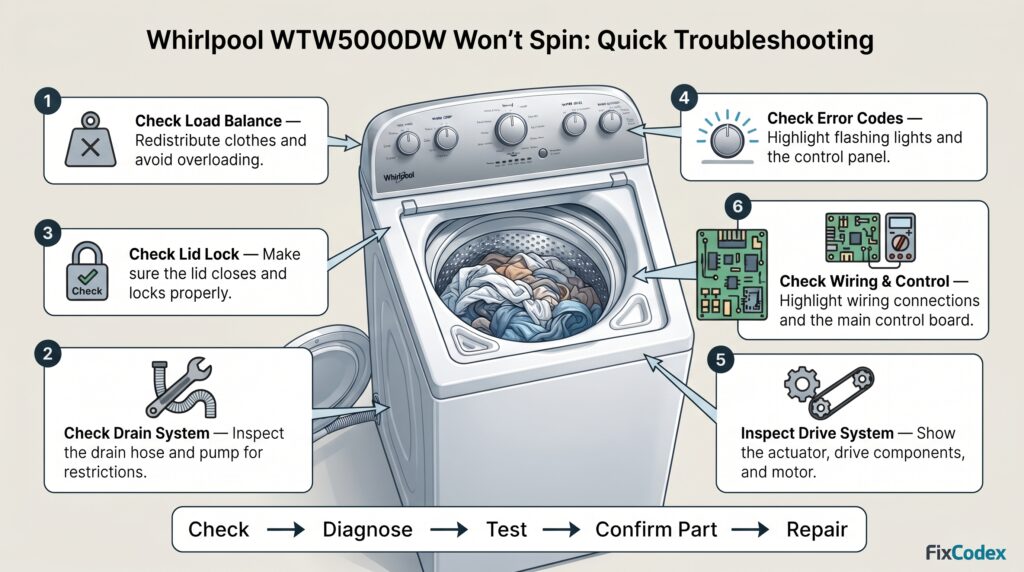
Before performing advanced diagnostics, try these basic checks:
- Make sure the washer is on a level surface.
- Check whether the load is too large or badly unbalanced.
- Redistribute the clothes evenly around the basket.
- Make sure the washer is able to drain the water.
- Check that the lid closes properly.
- Look for flashing indicator lights or error codes.
- Disconnect power before inspecting components.
- If the washer still won’t spin, inspect the lid-lock system, drain system, drive components, motor, wiring, and electronic control.
1. Check for an Unbalanced Load
One of the simplest reasons a WTW5000DW won’t spin properly is an unbalanced load.
If heavy clothing becomes concentrated on one side of the basket, the washer may stop or reduce the spin operation to prevent excessive vibration.
Try this:
- Open the lid.
- Redistribute the clothes evenly.
- Remove some items if the washer is overloaded.
- Make sure bulky items are not concentrated on one side.
- Close the lid and restart the cycle.
Avoid washing a single heavy item by itself when possible.
If the washer spins normally after redistributing the load, a mechanical failure may not be the cause.
2. Make Sure the Washer Can Drain
A Whirlpool washer may not enter or complete the spin portion of a cycle if water cannot drain properly.
Check the washer for standing water after the cycle stops.
Inspect the drain hose for:
- Kinks
- Blockages
- Improper installation
- Restrictions
A clogged or restricted drain system can cause the washer to remain full of water and prevent normal spin operation.
If your WTW5000DW won’t spin and won’t drain
Treat the drain problem as a priority.
A washer that cannot remove water may not proceed normally to the high-speed spin portion of the cycle.
3. Check the Lid and Lid-Lock System
The lid-sensing system is another important area to check when a Whirlpool WTW5000DW won’t spin.
The washer needs to detect the correct lid condition before certain portions of the cycle can operate.
Check for:
- Lid not closing completely
- Damaged lid strike
- Obstruction around the lid
- Damaged lid-lock mechanism
- Loose or damaged wiring
If the washer fills and agitates but refuses to spin, the lid-sensing system should be investigated.
Do not bypass safety-related components. Diagnose the system according to the appropriate service information for your washer.
4. Check for Error Codes or Flashing Lights
If your WTW5000DW stops before spinning, look at the control panel.
Pay attention to:
- Flashing indicator lights
- Repeating light patterns
- Beeping
- Error codes
- The point in the cycle where the washer stops
An error code can help identify the system that needs further investigation.
For example, a motor-related fault may point toward the drive system, while a lid-related fault may direct your attention to the lid-lock system.
Always verify the complete model number and the appropriate technical documentation before replacing a component.
5. Check the Drive System
The Whirlpool WTW5000DW uses a mechanical drive system to transfer power from the motor to the washer basket.
If the motor operates but the basket does not spin correctly, the drive system may need to be inspected.
Depending on the specific failure, possible areas include:
- Drive components
- Actuator
- Belt, where applicable
- Pulley
- Gearcase/transmission components
- Motor coupling or related drive components
The exact component configuration can vary by model revision, so verify the correct parts for your complete model number.
6. Inspect the Motor
If the washer does not spin, the motor may also require testing.
Possible motor-related symptoms include:
- Washer agitates but does not spin
- Washer stops during the cycle
- Washer makes unusual noises
- Washer produces a motor-related error
- Washer attempts to spin but stops
A motor fault is only one possible cause.
Before replacing the motor, check the wiring, connectors, drive system, and control system as appropriate.
7. Check the Washer Wiring and Connections
Loose or damaged wiring can cause intermittent or complete loss of operation.
Before inspecting electrical connections, disconnect the washer from power.
Look for:
- Loose connectors
- Damaged wires
- Burned terminals
- Corrosion
- Broken connectors
- Wiring that has become disconnected
Pay particular attention to wiring associated with the motor, actuator, lid-lock system, and electronic control.
8. The Control Board May Be the Problem
If the washer has been properly diagnosed and the mechanical components, motor, lid system, and wiring appear to be functioning correctly, the main electronic control may need further testing.
A control problem can cause symptoms such as:
- Washer won’t spin
- Washer stops unexpectedly
- Washer starts intermittently
- Motor does not receive the expected control signal
- Unusual flashing lights
- Multiple functions behave incorrectly
However, do not automatically replace the control board because the washer won’t spin.
Several other components can create similar symptoms.
A better approach is:
Symptom → Diagnose → Test → Confirm failed component → Replace part
Whirlpool WTW5000DW Won’t Spin but Will Agitate
If your WTW5000DW agitates normally but does not spin, focus your troubleshooting on components involved in the spin portion of the cycle.
Possible areas include:
- Lid-lock system
- Drain system
- Actuator
- Drive system
- Motor
- Wiring
- Electronic control
Start with the simplest checks first.
If the washer drains properly and the lid is recognized as closed, further diagnosis of the drive and motor system may be necessary.
Whirlpool WTW5000DW Won’t Spin but Drains
If the washer drains normally but the basket does not spin, the problem is less likely to be a simple drain restriction.
Check:
- Lid-lock operation
- Error codes or flashing lights
- Drive components
- Actuator
- Motor
- Wiring and connectors
- Electronic control
The exact failed component should be confirmed before purchasing a replacement part.
Whirlpool WTW5000DW Won’t Spin or Agitate
If the WTW5000DW won’t spin and won’t agitate, investigate the problem more broadly.
Possible causes include:
- Motor problem
- Drive-system problem
- Actuator problem
- Electrical connection
- Control problem
- Lid-related issue
- Power or wiring problem
Check the control panel for error codes or flashing lights and determine whether the washer is receiving power and responding to commands.
Whirlpool WTW5000DW Makes Noise but Won’t Spin
Unusual noises can provide useful diagnostic clues.
Grinding noise
May indicate a problem involving a mechanical or drive component.
Humming noise
May indicate that a motor or another component is receiving power but cannot operate normally.
Clicking noise
May be associated with a control, actuator, relay, or mechanical component.
Loud banging
May be caused by an unbalanced load or an issue with the washer’s mechanical system.
Don’t diagnose a part based only on noise. Use the noise together with the washer’s other symptoms.
Whirlpool WTW5000DW Stops Before Spin Cycle
If the washer completes washing or agitation but stops before spinning, check:
- Whether the washer has drained completely
- Whether the lid is closing correctly
- Whether any error code is displayed
- Whether the load is badly unbalanced
- Whether the motor and drive system operate correctly
If the problem occurs repeatedly with different loads, further component testing may be necessary.
Washer Won’t Spin or Drain? Watch This!
Is your washer not spinning or draining properly, making a grinding noise, or leaving clothes soaking wet? This helpful video by Helping U online shows common causes and troubleshooting tips to help you understand what may be wrong.
▶️ Watch the video to learn what to check before replacing any parts.
Whirlpool WTW5000DW Error Codes Related to Spinning
Some error codes can help point toward the system responsible for a spin problem.
Common examples may include motor-, lid-, water-level-, or drain-related faults.
| Error Code | Possible Area | What to Check |
|---|---|---|
| F5 E1 | Lid system | Lid, lid strike, lid-lock system, wiring |
| F5 E2 | Lid lock | Lid closure and locking mechanism |
| F5 E3 | Lid lock | Obstructions and lid-lock system |
| F7 E1 | Motor/speed sensing | Motor, wiring, connections, drive components |
| F7 E2 | Motor/control | Motor circuit, wiring, electronic control |
| F7 E5 | Motor/drive | Drive system, motor, wiring, control |
| F9 E1 | Drain system | Drain hose, drain system, pump |
Error codes are useful diagnostic clues but do not necessarily identify a specific failed part. Confirm the cause before ordering a replacement component.
Parts That May Cause a WTW5000DW Spin Problem
Depending on the symptoms and diagnostic results, several components may need to be investigated.
Possible parts include:
- Lid-lock or lid-switch components
- Actuator
- Motor
- Drive components
- Drain pump
- Main electronic control
- Wiring harnesses
- Connectors
- Other mechanical components
The correct replacement part depends on the complete Whirlpool model number and the specific washer revision.
How to Diagnose a WTW5000DW That Won’t Spin
Use this basic troubleshooting sequence:
WTW5000DW won’t spin
↓
Check the load
↓
Check whether the washer drains
↓
Check the lid and lid-lock system
↓
Check error codes/flashing lights
↓
Inspect wiring and connectors
↓
Test the drive system
↓
Test the motor and related components
↓
Check the electronic control
↓
Confirm the failed component
↓
Replace the correct part
This method can help prevent unnecessary parts replacement.
When Should You Replace the Control Board?
A control board should generally be considered only after other possible causes have been investigated.
A new control board may not fix the problem if the actual cause is:
- A failed actuator
- A motor problem
- A lid-lock problem
- A drain problem
- Damaged wiring
- A mechanical drive problem
Always verify the correct control-board part number using the complete washer model number before ordering.
Find Whirlpool WTW5000DW Parts
Need a replacement part for your Whirlpool WTW5000DW washer?
You may find replacement components such as control boards, actuators, pumps, lid components, motors, and other washer parts through online marketplaces.
Before ordering, verify:
- Complete model number
- Part number
- Component description
- Compatibility
- Seller information
- Current shipping and return terms
Check the complete model number before purchasing to help ensure the part fits your washer.
Frequently Asked Questions
Why won’t my Whirlpool WTW5000DW spin?
A WTW5000DW that won’t spin may have an unbalanced load, drain problem, lid-lock issue, actuator problem, motor or drive-system problem, wiring issue, or electronic control problem.
Why does my WTW5000DW agitate but not spin?
If the washer agitates but won’t spin, investigate the lid-lock system, drain system, actuator, drive components, motor, wiring, and control system.
Why won’t my Whirlpool washer spin or drain?
A restricted drain system can prevent the washer from completing the cycle normally. Check the drain hose and drain system first. If the washer still won’t spin or drain, further diagnosis may be required.
Can a bad lid lock cause a WTW5000DW not to spin?
Yes. A problem with the lid-sensing or locking system can prevent certain washer operations, including the spin portion of the cycle.
Can a bad control board cause a Whirlpool WTW5000DW not to spin?
Yes, a control problem can cause a spin failure. However, other components can create similar symptoms, so the control board should be properly diagnosed before replacement.
Should I replace the motor if my WTW5000DW won’t spin?
Not necessarily. A washer that won’t spin can have several possible causes. Check the load, drain system, lid system, drive components, wiring, and diagnostic information before replacing the motor.
How do I find the correct WTW5000DW replacement part?
Use the complete model number from the washer’s identification label and compare it with the replacement part’s compatibility information. Model suffixes can be important when identifying the correct component.
When a Whirlpool WTW5000DW won’t spin, don’t immediately assume the control board or motor has failed.
Start with the simple checks: load balance, drainage, lid closure, error codes, and visible wiring problems. If those checks don’t solve the problem, continue with testing of the lid system, actuator, drive system, motor, and electronic control.
The most reliable approach is to diagnose the failed component before ordering a replacement part.
If you are shopping for WTW5000DW parts, always use the complete model number and verify compatibility before purchasing.
Related Articles:
- Whirlpool WTW5000DW Won’t Start: Causes, Troubleshooting & Fixes
- Whirlpool Washer Error Code F3E5 – Temperature Sensor Error
- How to Fix Whirlpool Washer F3E3 Air Trap Fault
Affiliate Disclosure: This page contains affiliate links. We may earn a small commission if you purchase through a link, at no extra cost to you.
1 thought on “Whirlpool WTW5000DW Won’t Spin: Causes, Troubleshooting & Fixes”